Plinth & Worktop (Project)
These settings are project-wide (for the whole carcass run), not per carcass. You'll find them in the left sidebar under the Project tab. This is where the Placement (gaps), the plinth, the worktop and the export tolerance live.
Placement
- Gap between carcasses (0–50 mm): the space between adjacent
carcasses along the run.
0butts them together. Where two carcasses meet, they share their reveal (each side steps back by half the gap, so the two fronts meet with one reveal).
Island (second row, turned 180°)
Every carcass has a Dimensions → Row choice: Front (default) or Back. Back-row carcasses stand back to back with the front row: the whole row is turned 180°, its fronts face away, and its first carcass lands — seen from the front — on the right (walk round the island and it is on your left again). Between the two rows' backs lies the aisle (0–1500 mm): 0 is back-to-back, a few hundred millimetres makes a channel clamps reach into under a clamp-box top.
Both rows start at the left at 0 and get their own plinth. A worktop spans both rows and the aisle in one piece; its front overhang sits on the front row, its back overhang on the back row's front. If the rows differ in height the top rests on the taller one. The island's visible ends (the outer carcass sides of both rows) are ordinary sides — treat them as show faces for a piece standing in a room.
Export (3D/STEP)
- Joint clearance (0–2 mm, step 0.05):
the fit clearance at interlocking joinery (dovetail/box joint/groove) in the
STEP export.
0= exact press fit; higher values give a looser glue/assembly fit. Affects only the CAD export, not the cut list dimensions.
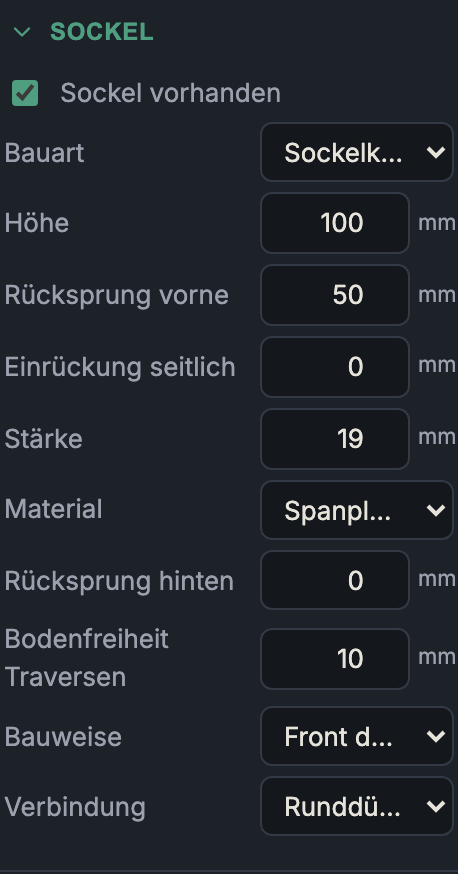
Plinth
- Plinth present: Places a plinth under the carcasses that have "Stands on plinth" set. Only then is this carcass option even available. Every carcass is screwed through its bottom into the plinth rails (4 mm screws, two per rail 80 mm from the ends, pilots in the rails' top edges); the screws appear in the hardware list and the drawings.
Type
- Plinth box: A complete plinth frame (sides + cross stretchers + plinth front + rear). The sturdy standard plinth.
- Front only (adjustable legs): Only the front plinth panel
(toe-kick); the carcass is carried by adjustable legs (e.g. Axilo), onto
which the front is clipped.
- Pros & cons: Adjustable legs compensate for uneven floors and allow a light, material-saving construction; the plinth box is stiffer and more enclosed.
- Laminated ladder (workbench): A ladder frame of flat strips
(default 100 mm wide), glued up several layers high — the plinth for a heavy
workbench. Long beams sit at the front, the back and (for an
island) under the seam between the rows;
cross beams at both run ends and at every carcass joint. Odd layers (1, 3,
…) run the long beams through, with the cross beams as filler pieces between
them; even layers run the cross beams through. Every crossing is thus
interlocked by the layer above and below — a half-lap without cutting one.
The result is one single frame for both rows of an island, with no joint
between them. Every butt joint (filler end against a beam's long edge) carries
the plinth joinery so each layer registers itself during the glue-up; Duo
pairs sit where the DuoDübler's stop pins place them at the end (15.5/47.5 mm
from the edge on a 100 mm strip), the position on the beam's long edge is
marked out.
- Build sequence: dowel and glue up layer 1 completely (the dowels align the pieces), then glue layer 2 onto it, and so on. The carcasses are finally screwed through their bottoms into the top layer (pilot holes in the beams' top faces, listed in the hardware list).
Dimensions
- Height (40–250 mm, default 100 mm): plinth height (= how far the carcass
is raised). For the laminated ladder it is not set but derived: caster height
- layers × thickness (shown in the panel).
- Front setback (0–150 mm, default 50 mm): how far the plinth front steps back from the carcass front edge (foot clearance/toe-kick).
- Side inset (0–150 mm): how far the plinth is inset at the ends of the run.
- Thickness (12–40 mm): material thickness of the plinth parts.
- Material: material of the plinth.
Plinth box only
- Rear setback (0–150 mm): how far the plinth steps back at the rear. A back panel slid in from below forces at least its own clearance (groove inset + panel thickness); the field is then a minimum and the effective value is shown beneath it.
- Stretcher ground clearance (0–40 mm, default 10 mm): the inner cross stretchers end far enough above the floor that only the outer sides and the front panel rest on it — more forgiving on uneven floors.
- Construction:
- Front through: the front (and rear) run through, with sides/stretchers between them — a clean, continuous plinth front.
- Sides through: the sides run the full depth, with front/rear between them.
- Joinery: how the plinth frame parts are joined (dowel/Domino/ biscuit/screws/groove — as with the carcass joinery).
Laminated ladder only
Layers (1–8, default 4): number of flat layers; each is one material thickness high (4 × 18 mm = a 72 mm frame).
Strip width (60–200 mm, default 100 mm): width of the beams in plan.
Caster / foot height (0–250 mm, default 0): overall height of the casters or levelling feet under the frame (floor to frame underside); 0 = the frame stands on the floor.
Casters / feet (2–12, default 6): count, half under the front and half under the back long beam, spread evenly from end beam to end beam. They are counted in the hardware list (unit price under "Prices"); their plate holes depend on the chosen model and are not drawn.
Feet: casters, spread evenly (as above) or levelling feet at the crossings (adjusted from above). Then a levelling foot sits beside every crossing of a long beam (the island seam included) with an end or joint cross beam – on the beam, next to the carcass wall and clear of the joints' dowels. Or levelling feet centred under each carcass (adjusted from above): one foot in the middle of every carcass on each long beam under it (front and back, under the island seam inside the front carcass). There the key has the most room to both side walls, and no dowels sit mid-beam. The walls then stand between the feet – no concern for a glued ladder. Build: a plate insert under the bottom layer, a threaded bolt with a pad, adjusted with a key from above: through a hole in the carcass bottom and a bore through every layer. Carcassist drills both, optionally the pilots for the plate screws, and counts feet, inserts and screws in the hardware list. The height becomes the gap to the floor (frame underside to floor). Every size comes from the data sheets of your parts:
Field Meaning Thread parts list only, e.g. M10 Bore through the layers Ø for the insert's barrel and the bolt Thread length barrel + plate – the bolt must stay engaged at least this far Plate length / width / thickness the insert's plate, laid along the beam Plate screw spacing centre to centre; 0 = none Pilot Ø / depth for the plate screws; 0 = no pilot Pad height floor to where the bolt enters the pad; 0 = unknown Pad diameter 3D view only; 0 = unknown Stem length the bought foot's threaded stem, from the pad to its tip; 0 = unknown Key hole Ø of the hole in the carcass bottom Offset foot centre from the crossing centre; 0 = automatic The 3D view shows the feet: insert plate, bolt (Ø from the thread, e.g. M10) and – once height and diameter are entered – the pad. Without a pad height the bolt reaches the floor.
With stem length and pad height, Carcassist shows the gap range this foot can reach: bounded below because the pad must fit under the insert plate and the bolt tip must not push out of the grid against the carcass bottom, and above because the bolt must stay fully in the thread. A set gap outside the range is an error in the check. The 3D view draws the bolt at its real length.
Without a stem length, shown are the ideal bolt length (top flush with the grid at the set gap – the bench can't go lower) and the travel upwards before the bolt leaves the thread, and – once the pad height is known – the minimum gap: pad + insert plate. At the lowest setting the pad sits right under the plate; with a smaller gap the pad doesn't fit and the bench would stand higher than planned. The insert defaults to an M10 plate insert, 40 × 25 × 2 mm plate with a Ø12 × 10 mm barrel; nothing about the foot itself is assumed. If a key hole finds no carcass bottom, the check reports it.
Rated load per caster and payload (default 150 kg): with a rating, the check compares own weight + payload per caster.
Rear setback: applies only when there is no back row; in an island the second row gets the same front setback (toe-kick) as the first.
Joinery: dowel, Duo dowel, Domino, biscuit or screws at every butt joint of a layer (no groove).
Worktop
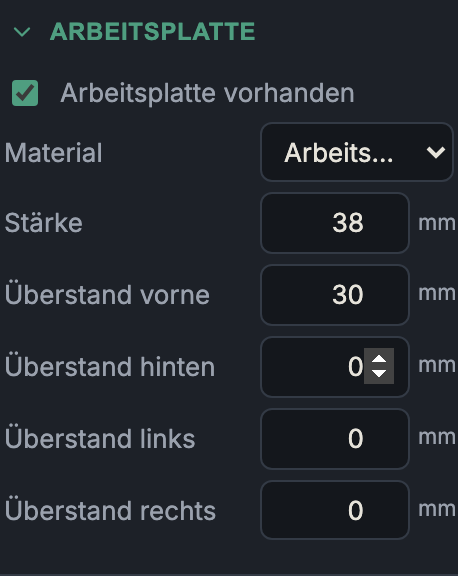
A solid slab sits on every carcass with "With worktop" set — adjacent carcasses of equal height share one piece. A clamp box always spans the whole run; the per-carcass option disappears then. On an island one piece spans both rows and the aisle and rests on the taller row.
| Setting | Range / default | Meaning |
|---|---|---|
| Worktop present | off | Enables the top. |
| Top style | Solid slab | Solid slab (one board) or Clamp box (a bench top with a dog-hole grid, below). Switching also swaps the material to that style's default. |
| Material | 38 mm worktop | The thickness follows the material — a board is its thickness — and is shown, not edited. |
| Front / back overhang | 0–150 mm, 30 / 0 | Past the carcass front/rear edge. On an island: front on the front row, back on the back row's front. |
| Left / right overhang | 0–300 mm, 0 | At the start/end of the run. |
With a clamp box, overhang is not needed for clamping — that happens from above through the holes. 40–60 mm at the front gives toe room and space for a clamp over the edge; more only for a face vise.
Clamp box
A thin skin with a hole grid over a rib box standing on the cabinets. The cabinets supply mass and stiffness; the box supplies the void under the skin that clamps and hold-downs reach into. With a bottom skin it is a complete torsion box: glued up flat on the bench, square on its own, then set onto the cabinets and shimmed.
Structure
| Setting | Range / default | Meaning |
|---|---|---|
| Material / skin thickness | 19 mm MDF | Thickness follows the material. Hole-grid accessories (clamping elements, hold-downs) are designed around 19 mm tops. |
| Overall height | 60–200 mm, 100 | Skin plus void. 100 mm is a quick-release clamp's hand room — shorten the cabinets accordingly. |
| Bottom skin | on | Closes the box underneath (torsion box). Costs no access: over cabinets you reach in from the long sides anyway. Off = ribs stand on the cabinets directly. |
| Rib material / thickness | 18 mm birch ply | Thickness follows the material. |
| Rib pitch | 96–960 mm, 288 | Ribs run front-to-back, spread evenly between the fixed points (ends, lane edges) and snapped to the midpoint between two hole columns — never a hole on a rib. No bay wider than pitch + grid. |
| Drilled ends | on | Both end boards are drilled on the skin's row positions, centred in height. |
Hole grid
| Setting | Range / default | Meaning |
|---|---|---|
| Hole grid | 32–200 mm, 96 | Centred on the skin; the first hole is at least half a grid from every edge. |
| Hole diameter | 10–40 mm, 20 | Through; visible in the drawing and in 3D (drilling on). |
| Hole chamfer | 0–3 mm, 1 | 45° chamfer at the rim on the entry side: on top of the skin, outside on ends and strips. Stops frayed rims and guides the dog. Exported as its own DXF layer CHAMFER_C<width>, as a real chamfer in STEP, and in the machining summary ("1 mm chamfer on top"). 0 = none. |
| Hole-free rows front / back | 0–6, 0 | Leaves rows out along the front/back edge, e.g. under a face vise. |
| Hole map | — | Top view (front at the bottom), one dot per position. Click = leave undrilled, click again = restore; faded dots are already removed by the lane, a rib or a hole-free row. Deselected holes are grid coordinates — if the run's length changes they follow the grid. |
Sacrificial strip
A replaceable, hole-free strip let flush into the skin, across the run — where the saw cut goes. The parts list shows Worktop left, Sacrificial strip and Worktop right; only the strip gets replaced. The grid continues across it in the same rhythm.
| Setting | Range / default | Meaning |
|---|---|---|
| Sacrificial strip | off | Enables the strip. |
| Centre (from left) | 600 mm | Position; clamped inside the run. |
| Width | 60–300 mm, 120 | Strip width. |
| Material | same as skin | Or its own board (birch ply, say): the top stays flush, the carrier ribs grow to suit. |
| Order the top skin in one piece | off | For ordering: cut list, material, nesting and DXF show the skin as one blank across the strip, with every hole. Drill it first, then cut the strip zone out with two plunge cuts — the halves keep their size, the piece between is waste. The part drawing shows the blank too, with the two cut lines (DXF layer CUT_LATER). 3D view, STEP and the overview sheet stay split; the strip and its carrier ribs stay in the list. |
Two rib boards of material thickness stand side by side under each edge (the joint runs between them: the outer one carries the skin, the inner one the strip and is lowered by the strip's thickness); each board has its own screw row. Hole columns too close to those ribs are dropped. The strip is screwed only, never glued.
Long sides
Every bay is a compartment between two ribs, reachable only through its own opening at the front or back. Hole clamps and hold-downs go in from above through the hole — they always work. An ordinary F-clamp needs an opening, and whatever falls through a hole only comes out of an open bay.
| Long side, front / back | Look | Access to the bay | Clamping at the edge |
|---|---|---|---|
| Open (default) | open | every bay | a clamp reaches under the skin anywhere |
| Clamping strips | nearly open | every bay | one drilled strip per bay against the left rib (width adjustable, default 80 mm) |
| Alternating | half closed | front: even bays open, back: odd — on an island every bay from one side | drilled, dominoed rails |
| Alternating fixed / loose | closed | every bay via its loose panel | on the fixed, drilled rails |
| Loose infill panels | closed | every bay (lift the panel out) | from above only — loose panels are undrilled, they take no clamp |
| Closed | closed | none | from above only |
Strips and rails are drilled on the skin's hole columns (an 80 mm strip catches one column, ~150 mm two), so a dog in the strip lines up with the grid. Loose panels have 1 mm clearance, no glue and no connectors. So they can't fall into the bay and magnets have a seat, every loose bay gets two stop strips (rib material, 20 mm deep, full void height), glued to the rib faces and set back by the panel thickness — the panel sits flush in the plane of the rib ends and stays removable. Magnets or turn buttons sit in the stops (not in the hardware list). Nothing of this under the sacrificial strip.
Assembly
| Joint | Construction |
|---|---|
| Ribs ↔ skins | countersunk 4 mm screws through both skins into the rib edges (Skins screwed down, pitch adjustable, default 192 mm = every second hole row). On the rib centrelines and between hole rows — never within 48 mm of a hole. The bottom skin is glued as well; the top skin is screwed only (replaceable) and located with two dry dowel pins per piece. |
| Strip ↔ carrier ribs | screws only, skin into the outer board, strip into the inner. |
| Strips / rails ↔ ribs | end grain on a rib face, two connectors per end at quarter heights: Domino 5×30 (default), 8 mm dowels, duo-dowel pairs (one centred pair when the board is too low for two) or screws. Written on both parts. |
| Box ↔ cabinets | four 4 mm screws per cabinet, from inside up through the cabinet top into the bottom skin (80 mm in from the corners). Stretcher-topped cabinets or an open-bottom box: none. |
| Grooves / rabbets | none — they cost the glue face its stiffness and the skin its replaceability. |
Order (step by step in the assembly guide): lay the frame of ribs and fixed aprons out upside down and loosely; glue on the factory-square bottom skin, push the aprons flush with its edges and screw it — it squares the box —, turn it over; locate the pre-drilled top skin with dowel pins and screw it only; sacrificial strip, stop strips and loose aprons; set onto the cabinets, shimmed, screwed from inside. Screws and connectors appear in the drilling, the drawing and the hardware list; the exploded 3D view shows them as solids.